
Direct Answer: The best smart home lighting system is the one that matches your home’s wiring, your household’s habits, and one consistent ecosystem, picked before you buy, not after.
A lot of homeowners on the Monterey Peninsula buy into smart lighting with real enthusiasm, and then spend the next six months dealing with switches that don’t respond, bulbs that reset after a guest touches the wrong wall plate, or devices that simply won’t talk to each other. The promise is a home that runs itself. The reality is often a frustrating mix of half-working automations and workarounds.
This isn’t a knock on smart lighting. When it’s set up correctly, it genuinely changes how a home feels day to day. But the best smart home lighting system for your house is not the one with the most features on the box, it’s the one that fits your wiring, your household’s habits, and a single consistent platform.
There are three things worth getting right before spending a dollar: whether to work at the switch or the bulb, which ecosystem to commit to, and what your wiring actually allows. Get those three right and the rest tends to fall into place.
The First Decision: Switch Level or Bulb Level
Most people skip this question entirely and go straight to picking a brand. That’s where the frustration starts.
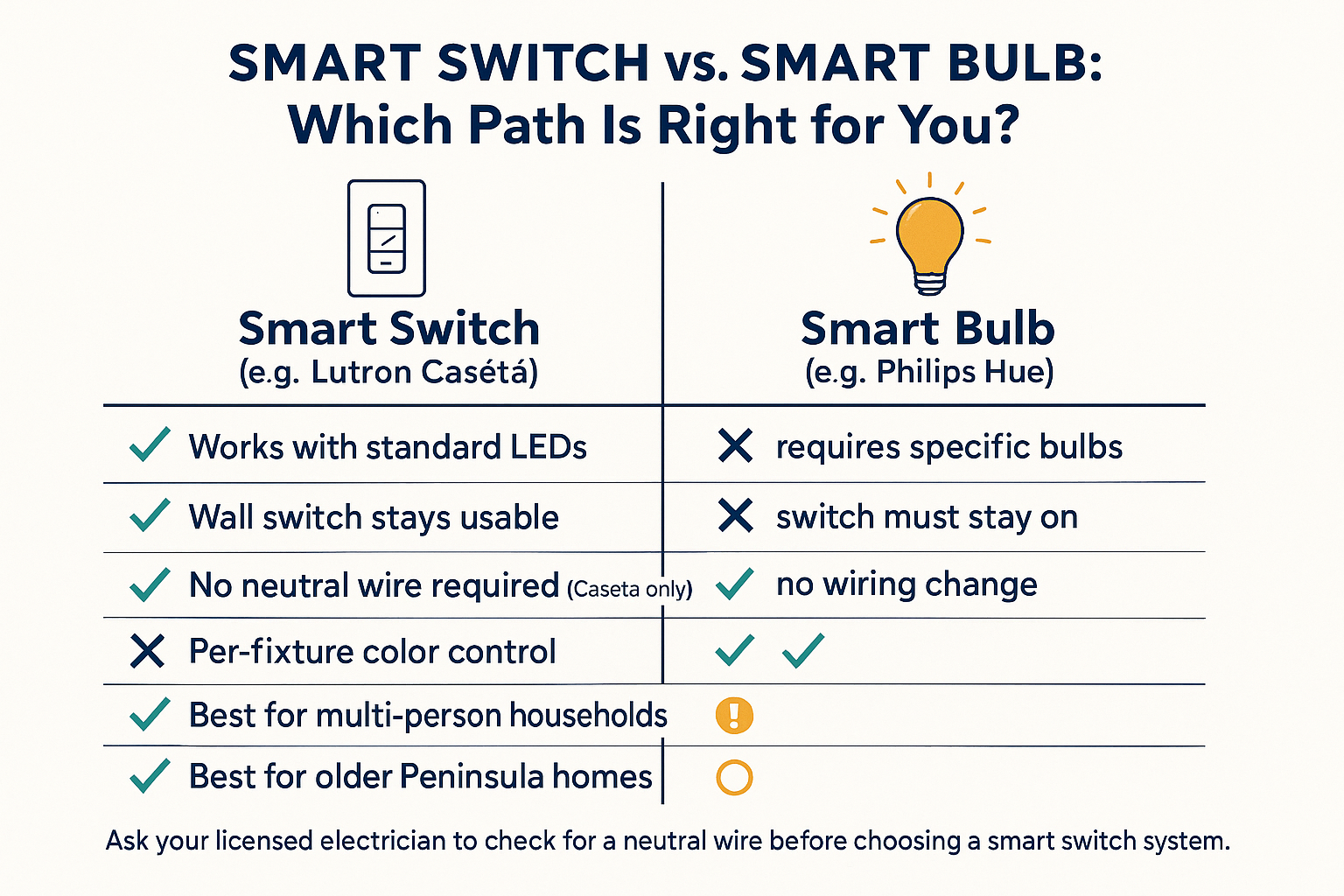
Smart bulbs replace the bulb itself, Philips Hue is the most recognized example. They offer per-fixture color control and precise dimming, and they’re easy to install. But they have a fundamental daily-use problem: the wall switch has to stay in the on position at all times. If anyone in the house flips that switch, a guest, a kid, a habit, the bulb loses power and drops out of the system entirely.
Smart switches replace the wall switch and work with almost any standard LED bulb. Lutron Caséta is the most commonly recommended system in this category. Because control happens at the switch rather than the bulb, a smart switch works the way people already expect a light to work. For households with multiple people and mixed habits, that durability in daily use matters more than the extra color options a smart bulb provides.
A few practical points worth knowing:
- Smart bulbs work best in lamps or fixtures with no wall switch controlling them
- Smart switches work best for overhead fixtures where multiple people share control
- Mixing both in a single home is common, but requires planning so they don’t conflict
- For kitchens and living rooms with multiple occupants, switch-based systems tend to hold up better over time
If you want to understand how control layers interact with fixture choices more broadly, the article on home lighting controls, dimmers, scenes, and smart systems covers the underlying concepts in plain language.
Wiring Reality in Older Peninsula Homes
This is the detail most articles skip, and it’s the one that causes the most installation-day surprises on the Monterey Peninsula.
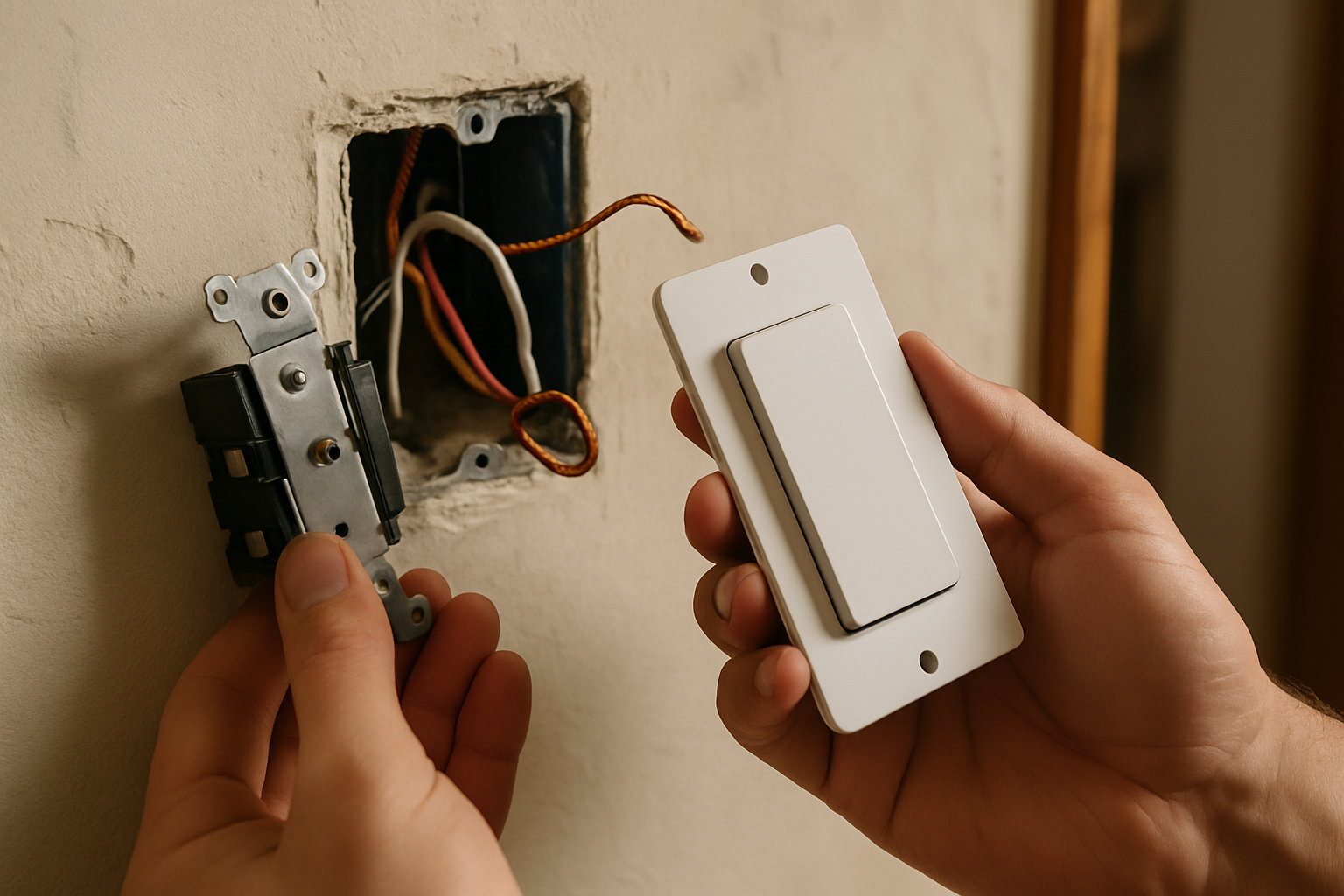
Many homes in Pacific Grove and Carmel were built before the 1980s. Wiring from that era frequently does not include a neutral wire at the switch box. Most smart switch models require a neutral wire to function. If your home doesn’t have one at each switch location, your options narrow significantly.
Lutron Caséta is one of the few smart switch systems specifically designed to work without a neutral wire. That makes it a meaningful choice for older homes where rewiring every switch box isn’t practical. But the only way to know what you’re working with is to have your licensed electrician check each switch location before you commit to a system. It’s typically a quick check, and it avoids a much larger headache after you’ve already purchased hardware.
A few things your electrician should look at:
- Whether a neutral wire is present in each switch box
- Whether existing dimmers are compatible with LED loads (older magnetic dimmers often aren’t)
- Whether multi-way switch setups (like a hallway controlled from two ends) are wired in a way that’s compatible with smart switch replacement
California’s Title 24 energy code, which has updates taking effect January 1, 2026, also governs lighting controls in remodels and new construction, including requirements around dimmers and vacancy sensors. If you’re doing a renovation alongside your smart lighting upgrade, it’s worth asking your contractor how those requirements apply to your specific project.
Switch vs. Bulb: Which Smart Lighting Path Fits Your Home?
This comparison lays out the core tradeoffs between smart switch systems and smart bulb systems so you can match the approach to how your household actually lives.
Compatibility Is Where Smart Lighting Most Often Falls Short
The marketing promise of smart lighting in 2026 is that everything works together. The real-world experience is more complicated.
Matter is the new universal standard that was supposed to solve cross-brand compatibility, letting devices from Apple, Google, Amazon, and others speak the same language. And it has improved things. But real-world reliability across platforms is still uneven. Philips Hue, for example, still requires its own Bridge hub for full scene and automation functionality, even with Matter support in place. Thread network support between Apple HomeKit, Amazon Alexa, and Google Home ecosystems is still converging, and not every device behaves consistently across all three.
The most practical advice here is simple: pick one ecosystem and stay within it. Choose Apple HomeKit, Google Home, or Amazon Alexa based on what devices you already use, and buy hardware that is certified for that platform. Don’t assume two devices will work together just because they both carry a Matter logo, check the compatibility list for your specific hub before purchasing.
This matters especially when you start adding automations. A schedule that tells your porch lights to come on at sunset works reliably when everything is in one ecosystem. When you mix platforms, those automations become fragile, and fragile automations are the thing that makes people give up on smart lighting entirely.
For context on how fixture selection interacts with lighting design decisions across a whole home, it helps to think through the control layer and the fixture layer together rather than separately.
The Three Automation Layers Worth Understanding
The most satisfying smart lighting setups don’t require you to pull out your phone every time you want to change a scene. They run quietly in the background through well-built automations. There are three practical layers to know about.
Scheduling is the simplest and most reliable. You set a time, or a trigger like sunset, and the system handles it. Porch lights on at dusk, off at midnight. Kitchen lights at full brightness at 6 a.m., dimmed by 9 p.m. This layer requires almost no ongoing interaction once it’s set, and it tends to be the one homeowners use and appreciate most.
Scene recall is the second layer. A scene is a saved lighting state, a specific combination of which fixtures are on, at what brightness, and at what color temperature. You assign a scene to a button, a voice command, or a time trigger, and the whole room shifts at once. A kitchen that needs bright, cool task light during meal prep but warm, dimmed ambient light after dinner is a natural candidate for two scenes on a single schedule.
Presence sensing is the third layer, and the most complex. Motion sensors or geofencing can trigger lights based on who is home or which room is occupied. The concept is appealing, but the setup requires more calibration and more tolerance for occasional misfires. For most homeowners, scheduling and scene recall provide the best return without that complexity.
If you’re planning kitchen lighting that layers task and ambient light effectively, pairing that layout with a smart scene setup is one of the more practical applications of all three layers working together.
Quick Reference: Smart Lighting Approaches at a Glance
This table summarizes the core tradeoffs across the three main decisions a homeowner needs to make before choosing a smart lighting system.
| Decision | Option A | Option B | Best for Most Homes |
|---|---|---|---|
| Switch or bulb? | Smart switch (Lutron Caséta) | Smart bulb (Philips Hue) | Smart switch for shared spaces |
| Which ecosystem? | Apple HomeKit | Google Home or Amazon Alexa | Whichever you already use |
| Older wiring? | Caséta (no neutral needed) | Most other smart switches | Caséta for pre-1980s homes |
| Automation starting point? | Scheduling + scene recall | Presence sensing | Scheduling first, always |
| Cross-brand mixing? | Stay within one platform | Mix Matter devices carefully | One ecosystem, stay consistent |
A Note on Fixture Compatibility Before You Automate
Smart switches and smart bulbs both have opinions about the fixtures they work with. This is worth checking before you assume your existing fixtures are compatible.
Many decorative fixtures, chandeliers, pendant clusters, wall sconces, use bulbs that are not standard A19 shape. If you’re moving to a smart bulb system, you’ll need to confirm the smart bulb exists in the right base type and form factor for each fixture. Candelabra bases, G9 capsules, and globe shapes all have smart options, but they’re more limited than the standard bulb lineup.
Smart switches have their own consideration: minimum load requirements. If a switch is controlling a single low-wattage LED bulb, some smart dimmers will flicker or buzz because the load is too low. Lutron Caséta handles low LED loads better than many competitors, but it’s still worth checking the fixture wattage against the switch’s rated minimum before assuming it will work cleanly.
If you’re also thinking through how lighting choices affect the overall feel of a room beyond just the bulb, those fixture-level decisions and smart control decisions are worth making at the same time rather than in sequence. The Connectivity Standards Alliance maintains current documentation on Matter-certified devices if you want to verify a specific product’s compatibility before purchasing.
Frequently Asked Questions About Smart Home Lighting Systems
Do I need to replace my existing light fixtures to use a smart lighting system?
Usually not. Smart switches replace the wall switch and work with whatever bulbs are already in your fixtures. Smart bulbs replace just the bulb. In most cases you can keep your existing fixtures unless you’re also doing a broader renovation.
My home was built in the 1960s in Pacific Grove. Will smart switches work with my wiring?
Possibly, but you need your electrician to check first. Homes from that era often lack a neutral wire at the switch box, which rules out most smart switch models. Lutron Caséta is one of the few systems that doesn’t require a neutral wire, making it a common recommendation for older Peninsula homes. A quick look inside the switch box by a licensed electrician will tell you exactly what you’re working with before you spend anything.
Can I mix Philips Hue bulbs with a Google Home setup?
Yes, but with caveats. Philips Hue still requires its own Bridge hub for full functionality, including scenes and automations, even when connected to Google Home. Matter has improved cross-platform support, but don’t assume everything will work out of the box. Test before you buy in bulk, and check Philips Hue’s official compatibility documentation for your specific Google Home hub version.
What’s the easiest automation to set up that I’ll actually use every day?
Scheduling. Set your porch lights to turn on at sunset and off at midnight. Set your kitchen overhead lights to dim after 8 p.m. These run on their own and require no daily interaction. Most homeowners get more consistent daily value from well-built schedules than from any other smart lighting feature.
Does California Title 24 affect smart lighting choices for a remodel?
It can. California’s Title 24 energy code, with updates effective January 1, 2026, includes requirements around dimmers, lighting controls, and vacancy sensors for remodeled and new construction spaces. The specifics depend on your project type and scope. Your contractor or a licensed electrician who works in Monterey County can tell you how the current code applies to your particular job.
Should I buy a smart lighting system online or work with someone locally?
Buying online is fine for commodity hardware like bulbs or a single smart switch. Where local guidance pays off is in fixture selection, making sure the smart control layer is compatible with the decorative fixtures you’re choosing, and that the color temperature and dimming behavior match how you want each room to feel. Those decisions are easier to get right when you can see the fixtures in person and talk through the plan rather than guessing from a product page.
Ready to Pick a System That Will Actually Work for Your Home?
Greg and Tammy at The Home Lighter have helped Monterey Peninsula homeowners sort through smart lighting decisions for years, including the wiring questions, the fixture compatibility issues, and the ecosystem choices that trip people up before they even get started. Walk-ins are welcome at the showroom at 2034 Sunset Drive in Pacific Grove, and appointments are available for more involved projects. Give them a call at (831) 655-5500 if you want to talk through your specific situation before you buy.